
Skill developments
VIDEO EDITING
First editing experience: Senior House Art (Harrow Bangkok)
This was actually my first time trying to officially edit something (for an actual purpose as well). I took on this job in one of the most busiest time of my filming schedule for our coursework but it did work out well in the end. There were many hardships I faced throughout this process, and many things I learned from this as well. First of all, the filming was picked up by me only when the event was about to end. I was part of this House competition myself, but because I wanted to share it, I started picking up my camera to film. There was no specific shot list I had in my mind, I only wanted to capture everything I could. But the good thing was, I took charge of editing as well so at least what I want would be in it. It was a bit hard, filming alone, and there were so many problems that rose such as the SD card being lost, dying battery, borrowing other's phone to film, etc. But I got everything in the end anyways. Then came the editing part; since it was my first time editing (and for our school's production, Lion View), I felt more pressure in trying to make it good. It was my first time using Premiere Pro, so I had a lot to learn and very little time to make things perfect. Then came one day, after I finished my first draft, I made a fatal mistake that led me to despair. I 'moved' the folder (where all my video files are) into another folder, which made the application to erase all the footages I have used as the filepath was moved. I tried to relocate it, but my Mac book could not follow such heavy processing, which in the end causing my computer to break down. I gave up relocating, so I went to manually select the video files and replace them (as it was after my first draft, the layout was already there.) But no, something even more tragic happened - the entire layout was wiped clean and I had to start from square one. I cried that night to be honest, and I even made my teacher frustrated. So, angrily, I tried to finish editing in one night. And I actually finished editing the entire thing (again) in one day. I am very thankful that the teacher liked it very much despite my un-professionalism. And it got upload, and I was very happy as well.
Harrow Bangkok 6th Form Charity: Pajamas Day
For this Pajamas Day video, I had not taken part in any of the filming and I was given the job of editing on a random morning but I didn't find it hard because I had experience with the first video I've edited. But what I found difficult was lack of actual content of what happened during Pajamas day and a failure to project the true intentions behind the creation of this event. But nonetheless, at the end it all went well and I'm happy my work got uploaded and be appreciated by the viewers.
This anti-smoking video was to be submitted to a promotional film to a competition locally here in Thailand. The storyboard and the script were written by the actors in the film and they are in Year 6 / Grade 5. This was part of, once again LVP, which was to include as much participation from the students themselves. I have helped them film, meaning taking care of the camera work and the editing. Subtitles will be put up soon after translation.
PHOTOGRAPHY
Double click to view on individual photographs. This helps me with frame compositions, subject lighting and colour grading / preset of the camera.
HARROW FAIR


ICON SIAM ft. Josh


LALA & TSEDEL : PROFILE SHOTS


May, Steph and Caesar


Bangkok and Mom


Yangon and Dad


ADOBE CREATIVE CLOUD
Masking on Premiere Pro
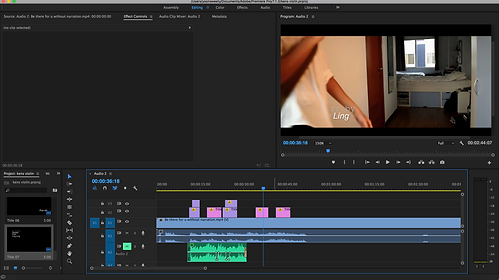
I first thought of this idea of 'disappering' text when our class had a discussion about the typography and how we displayed the text in our opening. I just suddenly thought of this idea and knew I had oto act on it. I knew the word 'masking' from Photoshop and didn't know how it worked in Premiere Pro. So then I watched a video on Youtube about how this could be made possible and now there it is on my opeing sequence.
Tracking on After Effects
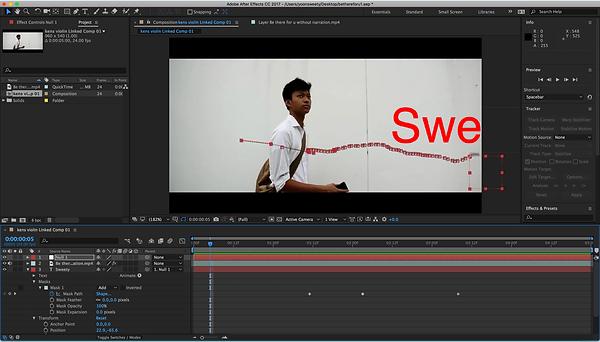
This tracking motion was also included as a technique to display my credits but in Premiere Pro I manually had to move the text every frame. Then the teacher from our class showed me a technique I could use in After Effects which tracks an object on the frame then attach the text box to it. This was my first time going at AE.
Photoshop for poster


I've used Photoshop before but this was the first time trying out the newest version and the features that were available in the app. It's mainly the brushes that I tried out with and I used them to paint the sky in which is seen in the picture. Typography/text letters were those of which were originally there in versions before this.
